Everything your notch can do.
A tour of Eave, recorded on a real Mac. Everything here is in the free trial.
Now Playing. Skip a song without leaving your work.
Album art, a progress bar you can drag, and play, pause, skip and back for Apple Music and Spotify. The notch glows in the colour of the song.
- Apple Music and Spotify
- Whichever one is playing shows up on its own. Eave never opens a player by itself.
- A glow in the song’s colour
- The closed notch picks up the colour of the album art, and changes with the song.
- Drag to any moment
- Scrub the progress bar to jump back to the chorus.
- A peek while you work
- With the notch closed, a small cover and moving bars tell you what is on.
- The last song stays
- Pause and the notch keeps the song ready, so play is one click away.
- Stays light
- Eave hears about song changes from the player itself. It never checks on a timer.
Volume and brightness. Pop‑ups that finally fit.
Eave moves the volume and brightness pop-ups out of the corner of your screen and into the notch, right where you are already looking. It shows when your AirPods connect, too, and when you plug in, how long until you are full.
- In the middle, not the corner
- A slim meter grows out of the notch, instead of a small pill up in the top corner.
- On the screen you are using
- Brightness changes the display under your pointer, and shows on that display.
- Headphones
- AirPods, Beats and other headphones show their name when they become the output.
- Never stuck
- If Eave ever steps aside, your keys go straight back to macOS. You never lose control of the volume.
Where you are already looking.
Since macOS 26, the volume and brightness pop-ups sit in a small pill in the top right corner. Eave brings them to the middle of the screen. Both pop-ups are real captures, shown where each one appears on a MacBook screen.


Charging. Know when you will be full.
Plug in and the notch shows your battery and the time left, like “Full in 1 hr, 5 min”. At 100%, a little confetti.
Mixer. Turn one app down. Leave the rest.
A volume slider for every app that is playing sound. Quieten a video without touching your music. While an app is turned down, macOS shows its recording dot; Eave only changes the volume.
- One slider per app
- Every app making sound gets its own row, from music to calls to videos.
- Heard once
- An app you turn down plays through Eave at its new level, never doubled.
- Honest about the dot
- macOS shows its recording indicator while an app is turned down. Audio is adjusted live and never recorded.
Shelf and AirDrop. Park files right under the notch.
Drop files on the notch to keep them close, then drag them out into any app. New screenshots land there too, ready to drag. Drop on AirDrop to share in one move.
- Drop in, drag out
- Drag a file to the notch to park it. Drag it out again into any app as a copy.
- Screenshots, ready
- Take a screenshot and it waits on the Shelf, ready to drop into a message.
- AirDrop in one move
- Drag a file to the notch and drop it on AirDrop to share it with a nearby device.
Stats. See why the fans came on.
CPU, memory and temperature, drawn live while you look and not a moment longer. If your Mac runs hot, the notch tells you.
- Three graphs
- CPU, memory and temperature, side by side.
- Only while you look
- Stats measures while the tab is on screen and stops the moment you leave it.
- A heads up
- When your Mac starts running hot, the notch lets you know.
Eavy. A tiny friend beside the notch.
Eavy sits beside the notch as Ghost or Clover the bunny. It taps along while you type, sways to your music, hugs the charger and dozes during Focus. It dresses for the season, too. Turn it on whenever you like.
- Ghost or Clover
- A little ghost or a little bunny. Pick one in Settings.
- Moods
- Typing, music, charging, Focus and a low battery each get their own reaction.
- Seasons
- Small touches for the time of year.
- Counts, never reads
- It knows how fast you type, never what you type. During passwords it counts nothing.
Themes and Settings. Make it yours.
Six themes, each with its own colours and motion, or design your own. Settings look and feel like System Settings, with a switch for every little thing.
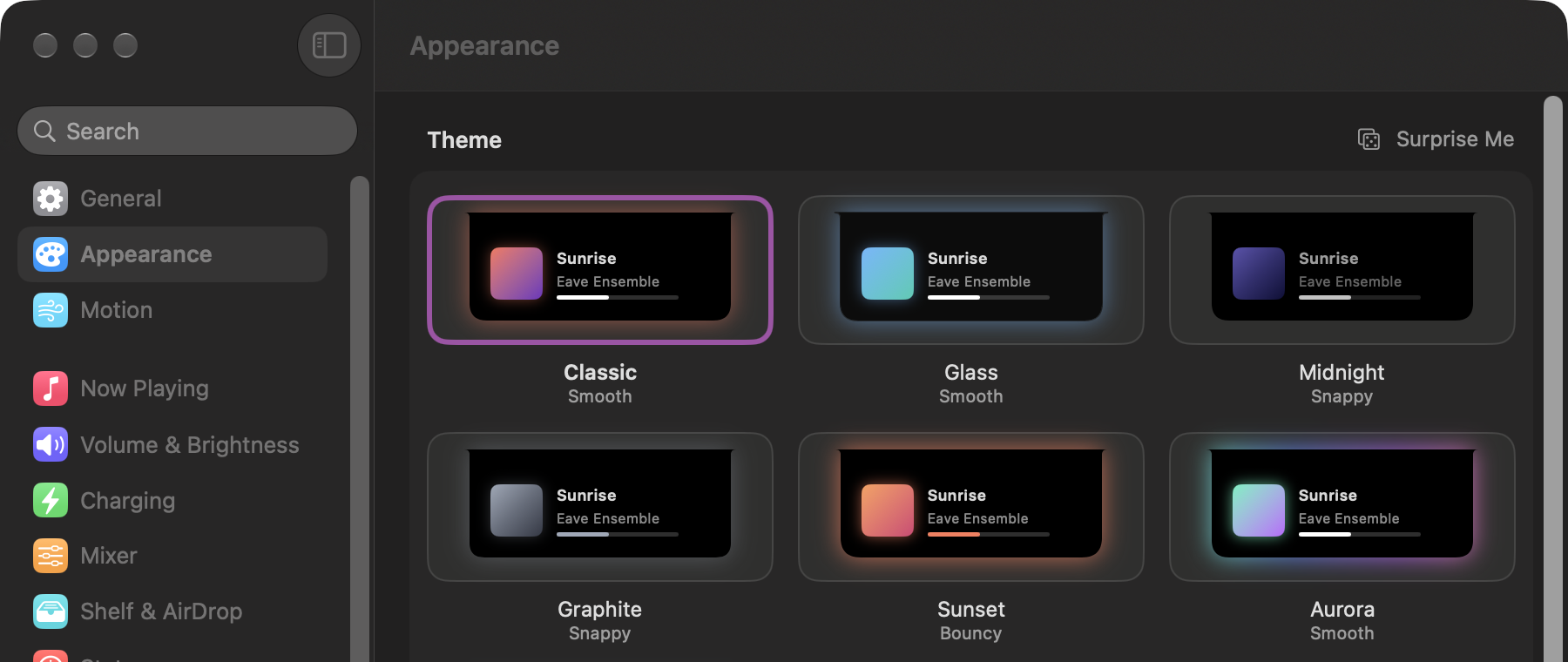
- Six themes
- Classic, Glass, Midnight, Graphite, Sunset and Aurora.
- Your own
- Start from any theme and change its colour, glow, glass and corners, with a live preview.
- A switch for everything
- Turn any feature or pop-up off, and Eave lets go of everything it used.
Little touches. Small moments that make you smile.
A hello the first time you open it, confetti when the battery reaches 100%, and a soft tap on the trackpad as you move between tabs.
No notch? No problem.
On Macs and displays without a notch, Eave draws its own small black pill at the top of the screen. Everything else works the same: songs, pop-ups, the Shelf, all of it.
And a few more things.
- Mirror
- Check how you look before a call. The camera runs only while the Mirror tab is open, and the green light goes out the moment you leave.
- Focus
- A small moon sits in the notch while a Focus is on, and a quick peek tells you when one starts or ends. Off until you turn it on.
- Swipes
- Two fingers over the open notch move between tabs, with a soft tap on the trackpad.
- Keyboard shortcut
- Open the notch from the keyboard, then move between tabs with the arrow keys.
- What’s New
- After an update, the open notch shows what changed. Once, then it gets out of the way.
Made for everyone.
Eave follows the accessibility settings you already use on your Mac.
- VoiceOver
- Every control is labelled, and pop-ups are read aloud.
- Keyboard
- Open, move and close the notch without a trackpad.
- Reduce Motion
- Movement becomes a gentle fade.
- Reduce Transparency
- Glass turns solid.
- Increase Contrast
- Edges and text get sharper.
- Differentiate Without Color
- States get shapes and symbols, not colour alone.

Give your notch something to do.
Free for 7 days. Then $9.99, once.
Try free for 7 days